
1、项目基础介绍
DbGate 是一个跨平台的数据库管理工具,支持多种数据库类型,包括 MySQL、PostgreSQL、SQL Server、MongoDB、SQLite 等。它旨在简化数据库管理工作,提供丰富的功能,如数据编辑、查询设计、架构比较等。DbGate 可以在 Windows、Linux、Mac 以及作为 Web 应用程序运行。
本文主要介绍此工具的部署安装方法
2、安装
准备工作
在开始安装 DbGate 之前,请确保您的系统满足以下要求:
Docker: 如果您计划在 Docker 容器中运行 DbGate。
检查容器运行时状态:
root@XiaoZhen-PC:~$ systemctl status docker
● docker.service - Docker Application Container Engine
Loaded: loaded (/lib/systemd/system/docker.service; enabled; vendor preset: enabled)
Active: active (running) since Wed 2025-04-16 16:14:17 CST; 5min ago
Docs: https://docs.docker.com
Main PID: 29787 (dockerd)
Tasks: 16
Memory: 514.4M
CGroup: /system.slice/docker.service
└─29787 /usr/bin/dockerd -H fd:// --containerd=/run/containerd/containerd.sock
root@XiaoZhen-PC:~$
拉取镜像:
root@XiaoZhen-PC:~$ sudo docker pull dbgate/dbgate
Using default tag: latest
latest: Pulling from dbgate/dbgate
23b7d26ef1d2: Pull complete
07d1b5af933d: Pull complete
1eb98adba0eb: Downloading [===================================> ] 45.34MB/64.4MB
1eb98adba0eb: Pull complete
b617a119f8a2: Pull complete
62a07249970c: Pull complete
3a708fd7b8ff: Pull complete
1d262fe5e85b: Pull complete
92e5b16b2e66: Pull complete
fd2fb5489f45: Pull complete
7509c94828b9: Pull complete
af409630f3fd: Pull complete
3cdeaf30cdc0: Pull complete
4f4fb700ef54: Pull complete
Digest: sha256:ad57a442df2d663eb001be6e11cccfc8686562734a62a1a09dc276416640d980
Status: Downloaded newer image for dbgate/dbgate:latest
docker.io/dbgate/dbgate:latest
查看镜像:
root@XiaoZhen-PC:~$ docker images
REPOSITORY TAG IMAGE ID CREATED SIZE
dbgate/dbgate latest 7e2f880aa6f0 6 days ago 1.25GB
tongweb8 latest 83a488e7d59a 2 weeks ago 1.03GB
uos-server-20-1070e-amd latest 388f81f198bf 11 months ago 482MB
uos-server-20-1070e latest 388f81f198bf 11 months ago 482MB
root@XiaoZhen-PC:~$
启动容器并暴露本地3000端口:
root@XiaoZhen-PC:~$ docker run -d --name mydbgate --restart always -p 3000:3000 dbgate/dbgate
0ec0d0a93a3cf6c7fba7d153943d4041babfa8f0906b2b4b3cfb5236dd99f585
root@XiaoZhen-PC:~$
查看容器是否正在运行:
root@XiaoZhen-PC:~$ docker ps -a
CONTAINER ID IMAGE COMMAND CREATED STATUS PORTS NAMES
0ec0d0a93a3c dbgate/dbgate "docker-entrypoint.s…" 9 minutes ago Up 9 minutes 0.0.0.0:3000->3000/tcp mydbgate
root@XiaoZhen-PC:~$
3、验证
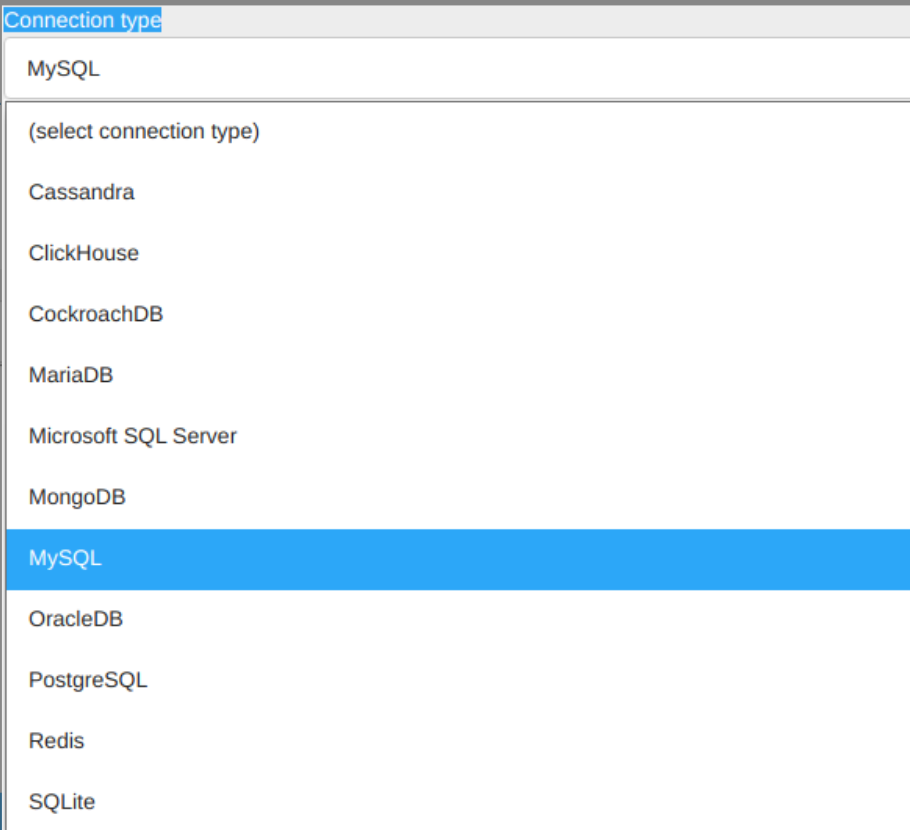
支持的Connection type:
访问本机3000端口:
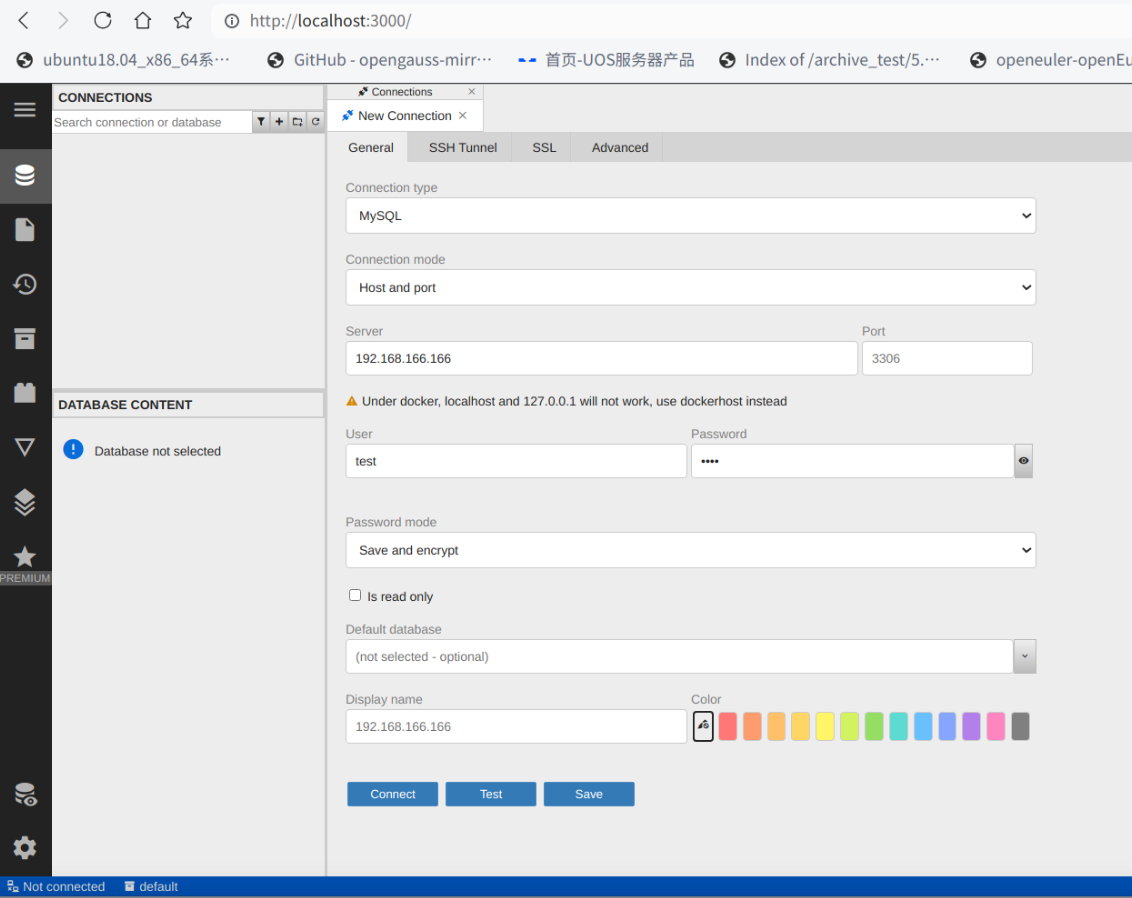
以上为数据库客户端工具的具体配置,可以在UOS服务器和桌面系统上部署。
©统信软件技术有限公司。访问者可将本网站提供的内容或服务用于个人学习、研究或欣赏,以及其他非商业性或非盈利性用途,但同时应遵守著作权法及其他相关法律的规定,不得侵犯本网站及相关权利人的合法权利。除此以外,将本网站任何内容或服务进行转载,须备注:该文档出自【faq.uniontech.com】统信软件知识分享平台。否则统信软件将追究相关版权责任。